Create and analyse 9×9 Vastu grids, map all 45 Devtas, evaluate 16 directional zones and 32 entrance padas, and generate client-ready PDF reports — directly from your browser across desktop, tablet, and mobile.
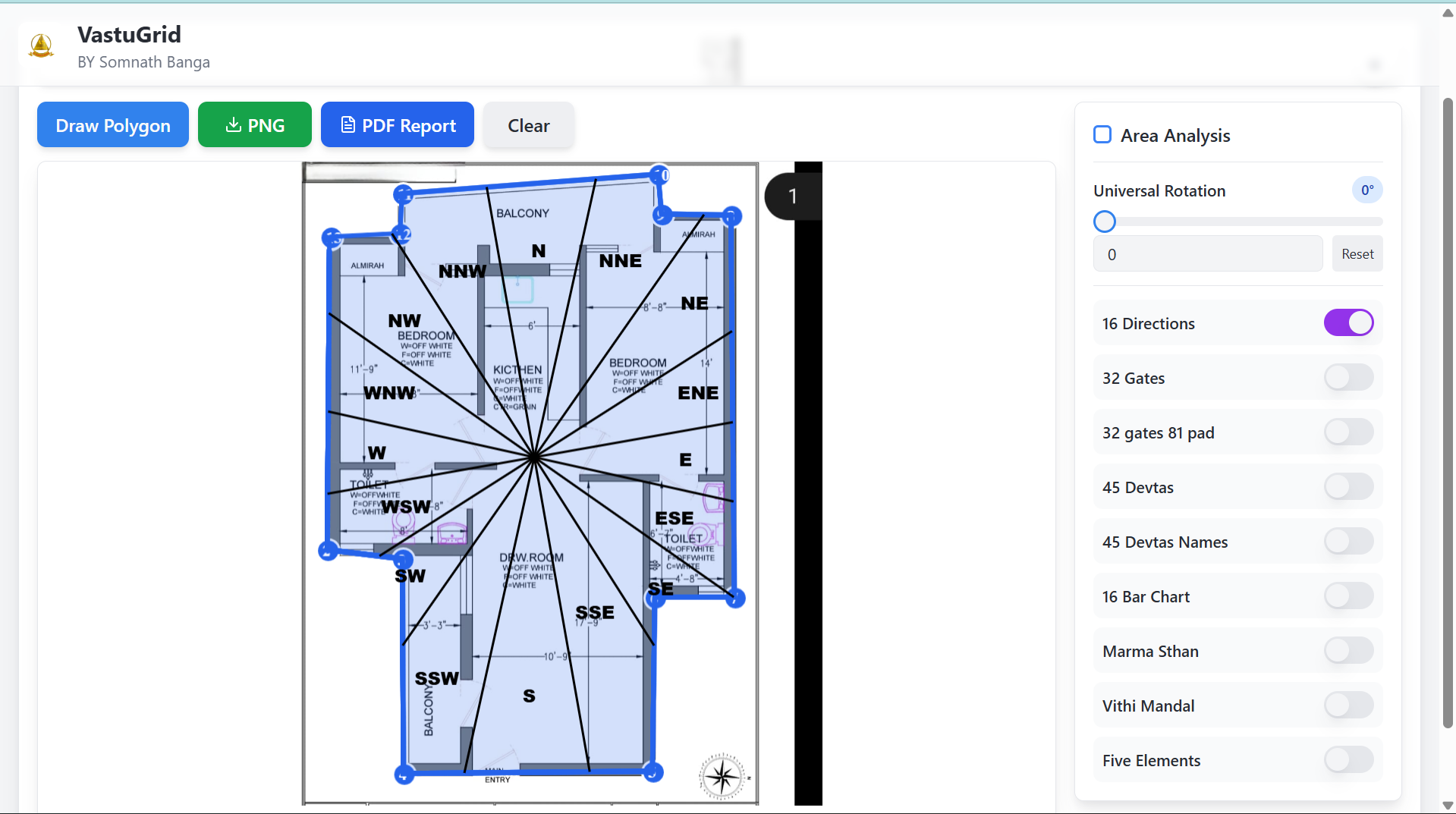
For a practicing Vastu consultant or architect, every property assessment requires a structured sequence: setting compass orientation, drafting boundary lines, finding the center, projecting the 9×9 Vastu Purusha Mandala, mapping 45 Devtas across 81 padas, evaluating 32 entrance padas, and preparing client documentation.
Done manually with paper, compass, or static CAD overlays, this work takes hours per property and easily introduces calculation mistakes — especially on skewed angles, non-parallel walls, and irregular plots.
VastuGrid is an online Vastu software platform built for Indian architectural and property analysis workflows. Trace property boundaries with polygon drafting tools or upload existing floor plan drawings (JPG/PNG), set compass orientation in degrees, and generate mathematically aligned grids in seconds.
From that single calibrated layout, every standard Vastu computation — 45 Devta positions, 16 directional zones, 32 entrance padas, Brahmasthan boundary, Marmasthan intersection lines, and Panch Tatva element distribution — is computed automatically without needing to look up reference tables manually.
Every VastuGrid assessment follows a structured 8-step workflow that creates a consistent, repeatable analysis process across residential, commercial, and industrial properties.
Professional Vastu analysis does not happen exclusively at an office desk. Consultants, architects, and property practitioners spend much of their time in the field: conducting on-site property audits, inspecting construction sites, walking through apartments with buyers, and meeting clients away from the office.
Traditional desktop-based Vastu software can limit practitioners to a specific computer or installation. VastuGrid runs directly in a modern web browser, making the same workflow accessible across desktop, tablet and mobile with zero software installation.
Ideal for detailed architectural analysis, high-resolution floor plan tracing, multi-room zoning, and full report preparation at your office desk.
Built for client consultations, architectural design meetings, and interactive walk-throughs where you want to present findings dynamically.
Engineered for field visits, construction site inspections, and property purchase evaluations right from your pocket without carrying a computer.
The 9×9 Vastu grid — representing the classical Vastu Purusha Mandala — is the foundational geometric diagram of Vastu Shastra. Described in classical texts including the Brihat Samhita, Manasara, and Mayamata, it divides any habitable space into 81 padas (sub-squares), each governed by specific cosmic and elemental energies.
VastuGrid generates this grid automatically from your drawn property boundary. The software calculates the boundary proportions, determines the center point, aligns the coordinate system with your compass orientation in degrees, and scales the 81 padas proportionally across the layout.
This 9×9 grid serves as the foundation for every subsequent calculation in VastuGrid: locating the Brahmasthan, identifying 16 directional zones, mapping all 45 Devtas, evaluating 32 perimeter entrance padas, and assessing elemental balance.
Beyond basic compass directions, VastuGrid evaluates property energy through multi-layered classical systems — mapping devtas, directional sectors, entrance gates, and elemental balance directly on the layout.
In classical Vastu Shastra, the 81 padas of the Vastu Purusha Mandala represent 45 distinct energy fields (Devtas) that govern specific physiological and spatial functions in a building.
VastuGrid maps all 45 Devtas to their pada locations automatically across the property layout, displaying visible labels and energy field boundaries directly over your floor plan.
Instead of manually looking up reference tables, consultants can instantly evaluate which Devta governs each room, entrance, or activity zone — identifying spatial harmony at a glance.
Advanced Vastu practice evaluates space through 16 directional zones: North (N), North-North-East (NNE), North-East (NE), East-North-East (ENE), East (E), East-South-East (ESE), South-East (SE), South-South-East (SSE), South (S), South-South-West (SSW), South-West (SW), West-South-West (WSW), West (W), West-North-West (WNW), North-West (NW), and North-North-West (NNW).
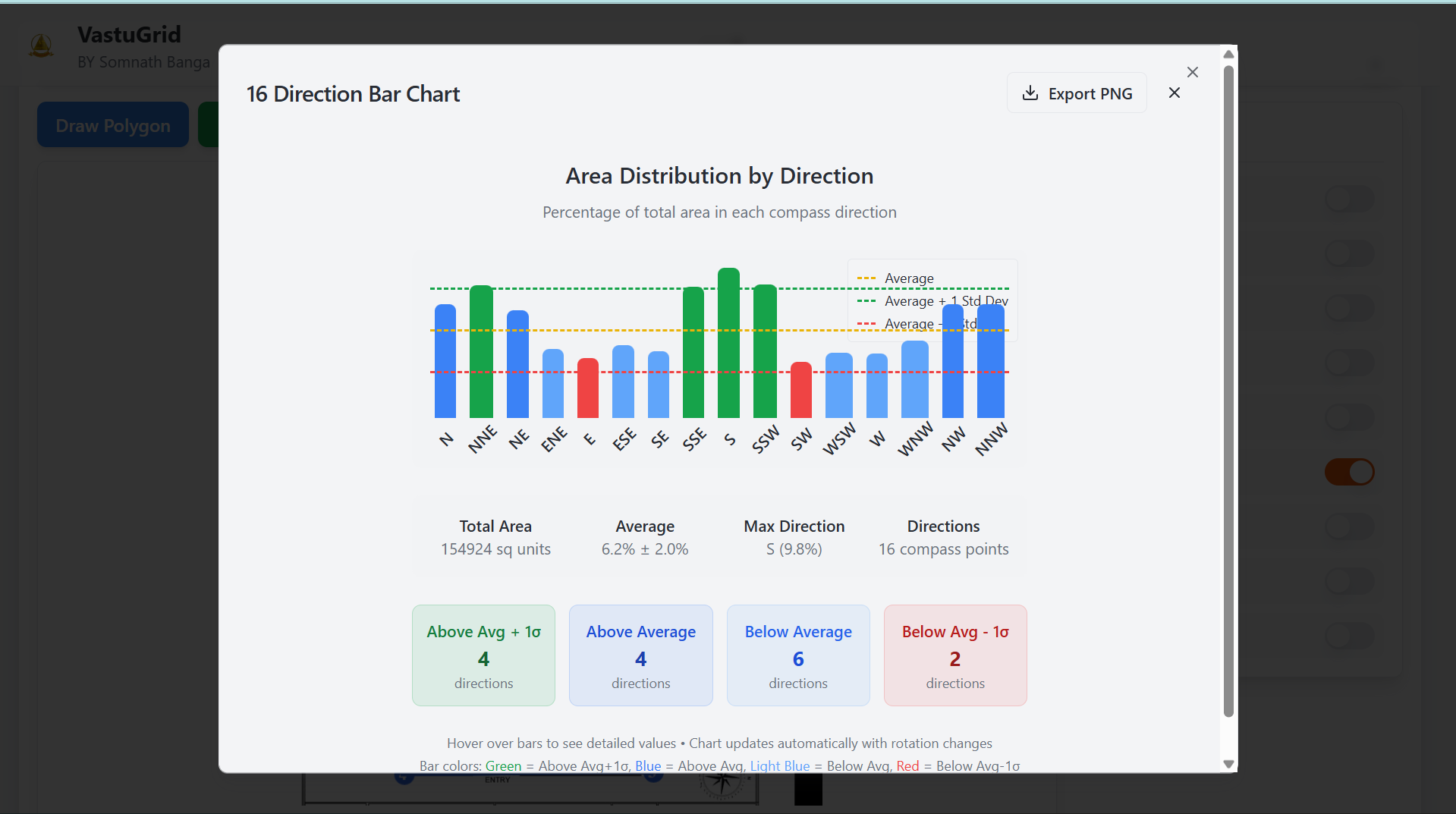
Every property has a distinct spatial footprint. Cut corners, extended balconies, or staggered wall layouts mean that energy is rarely distributed equally among the 16 sectors.
VastuGrid demarcates all 16 directional zones directly over the property plan and computes a visual Directional Energy Distribution Graph. This quantifies the proportional area of the building allocated to each zone, allowing practitioners to detect missing sectors, over-extended zones, and directional imbalances immediately.
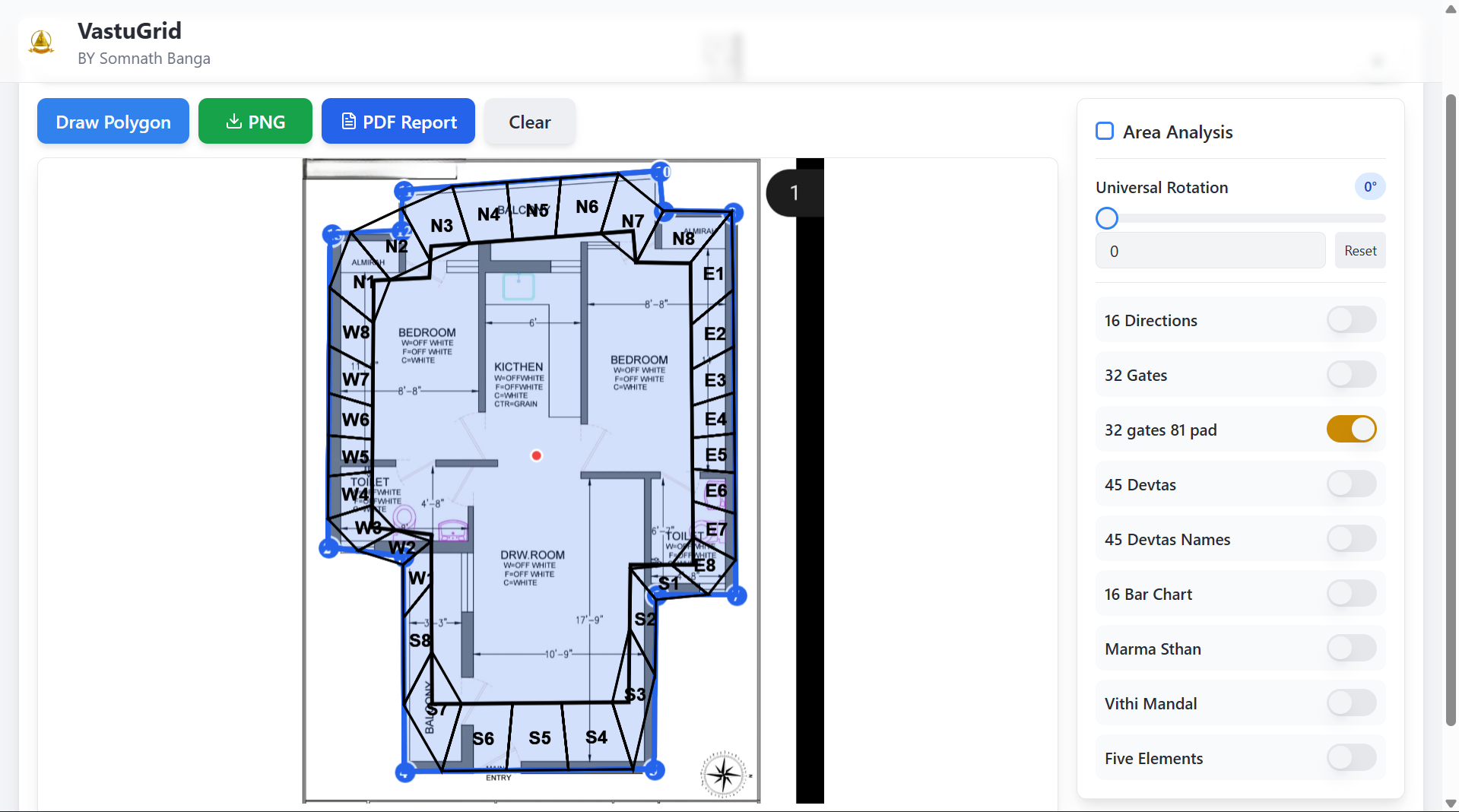
The entrance location (Mahadwara) is considered the single most critical factor in property Vastu. Energy enters the building primarily through its doors and gates. Classical Vastu texts divide the perimeter into 32 entrance padas — 8 along each of the four cardinal faces (North N1–N8, East E1–E8, South S1–S8, West W1–W8).
Each pada possesses distinct traditional attributes documented in ancient architectural treatises such as the Brihat Samhita and Vishwakarma Prakash.
VastuGrid calculates the angular positions of all 32 perimeter padas based on the property's compass orientation in degrees. You simply locate where the main gate or front door sits, and the software immediately displays its pada designation and classical classification — providing clear, objective analysis without relying on manual reference tables.
Beyond standard grid generation and entrance evaluation, VastuGrid includes specialized tools built for complex consultations and multi-disciplinary assessments:
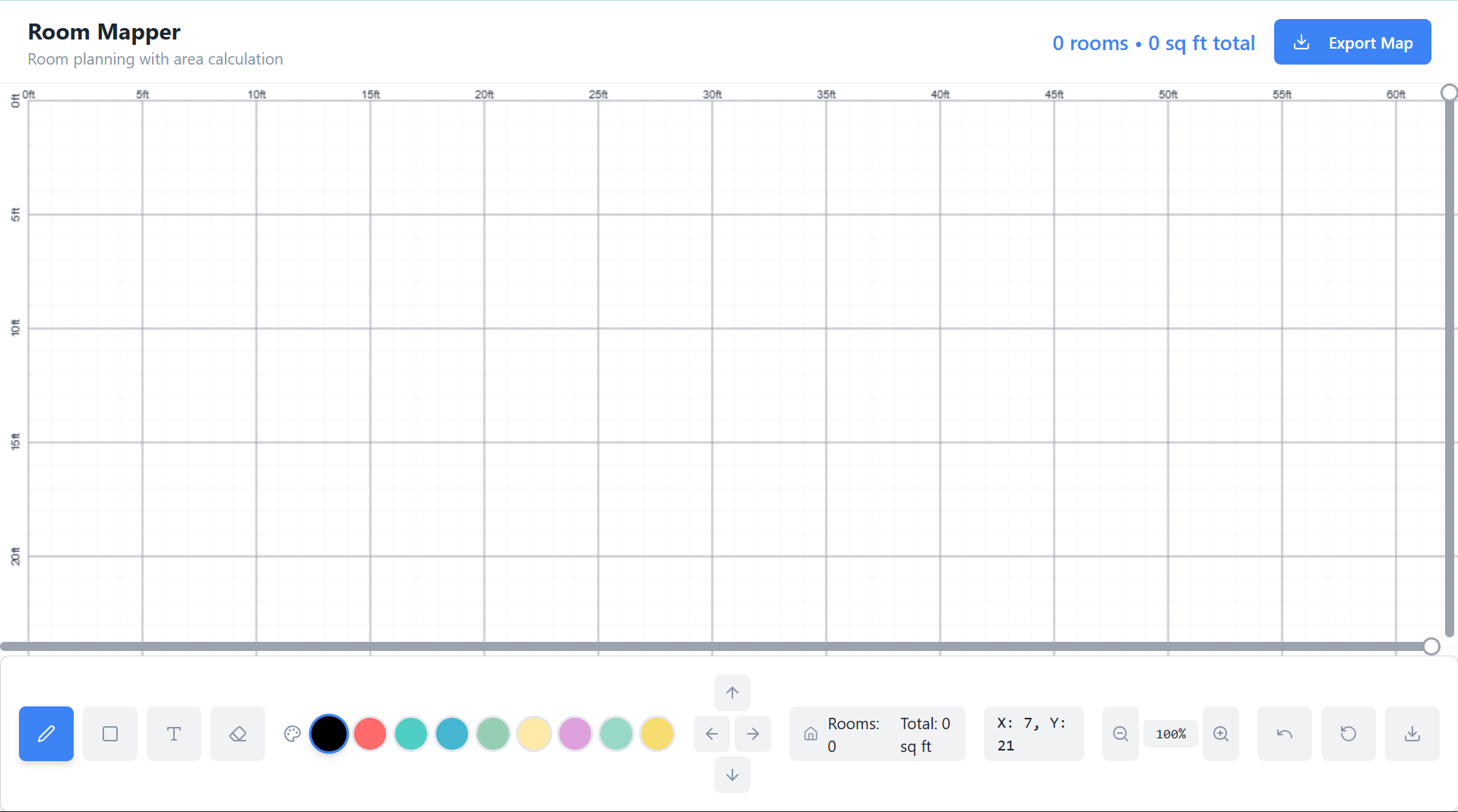
Calculates the center point and perimeter of the sacred central 9-pada zone, ensuring non-load-bearing architectural compliance.
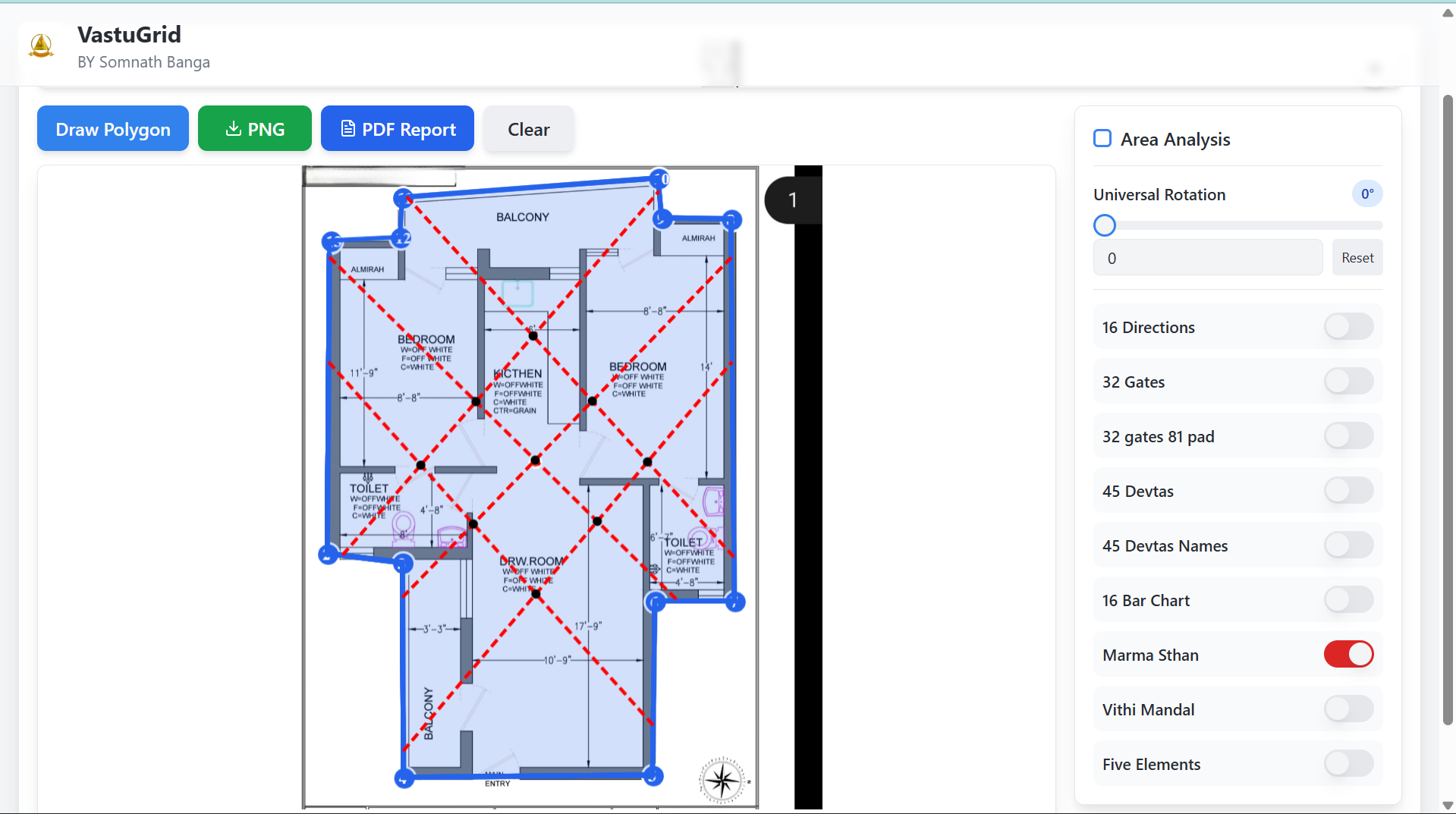
Identifies vital structural intersection points and diagonals across the 81 padas to prevent placing heavy pillars over sensitive energy nodes.
Demarcates Water, Air, Fire, Earth, and Space zones across the floor plan to diagnose elemental clashes such as kitchen fire in the water zone.
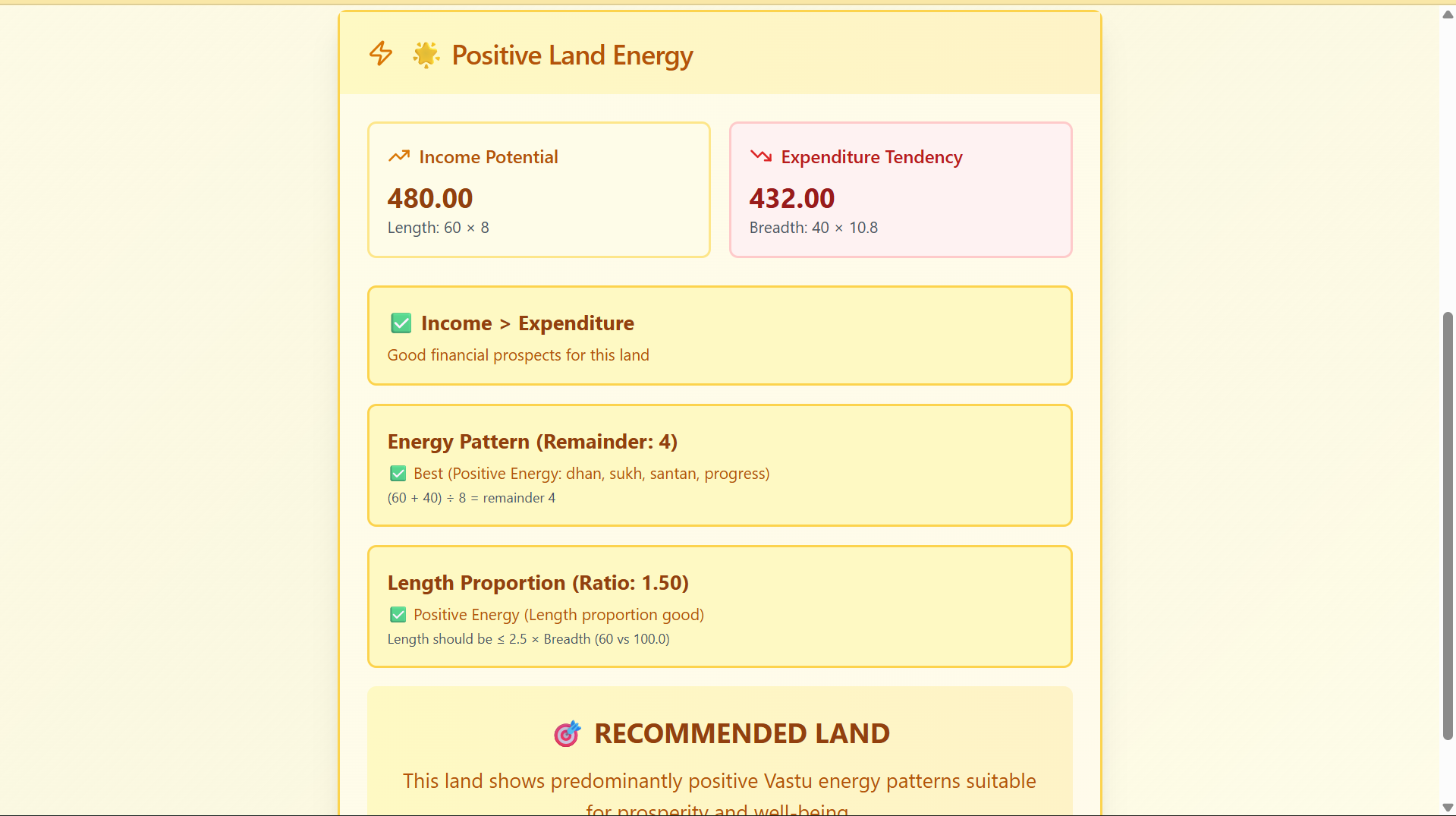
Evaluates raw plot suitability prior to purchase, checking topographical slopes, corner extensions, road alignments, and soil orientations.
Integrates numerological vibrations with spatial layout, evaluating house number compatibility, owner birth resonance, and directional alignments.
Provides a 360° circular directional wheel and planetary lordship overlay for practitioners combining astrology with architectural Vastu.
Every analysis follows a structured, repeatable sequence — converting raw property measurements and architectural drawings into deliverable advisory documentation.
Trace the property boundary using the polygon tool, or upload an existing architectural drawing (JPG/PNG) as a base layer for overlay analysis.
Establish the property's compass orientation in degrees. The software rotates and aligns the grid coordinate axes to match the property's orientation.
The 9×9 Vastu Purusha Mandala is calculated, scaled, and superimposed over the layout — automatically adapting to the plot's proportions.
Review 45 Devta positions, 16 directional zones, 32 entrance padas, Brahmasthan, Marmasthan, and element distribution with single-click toggles.
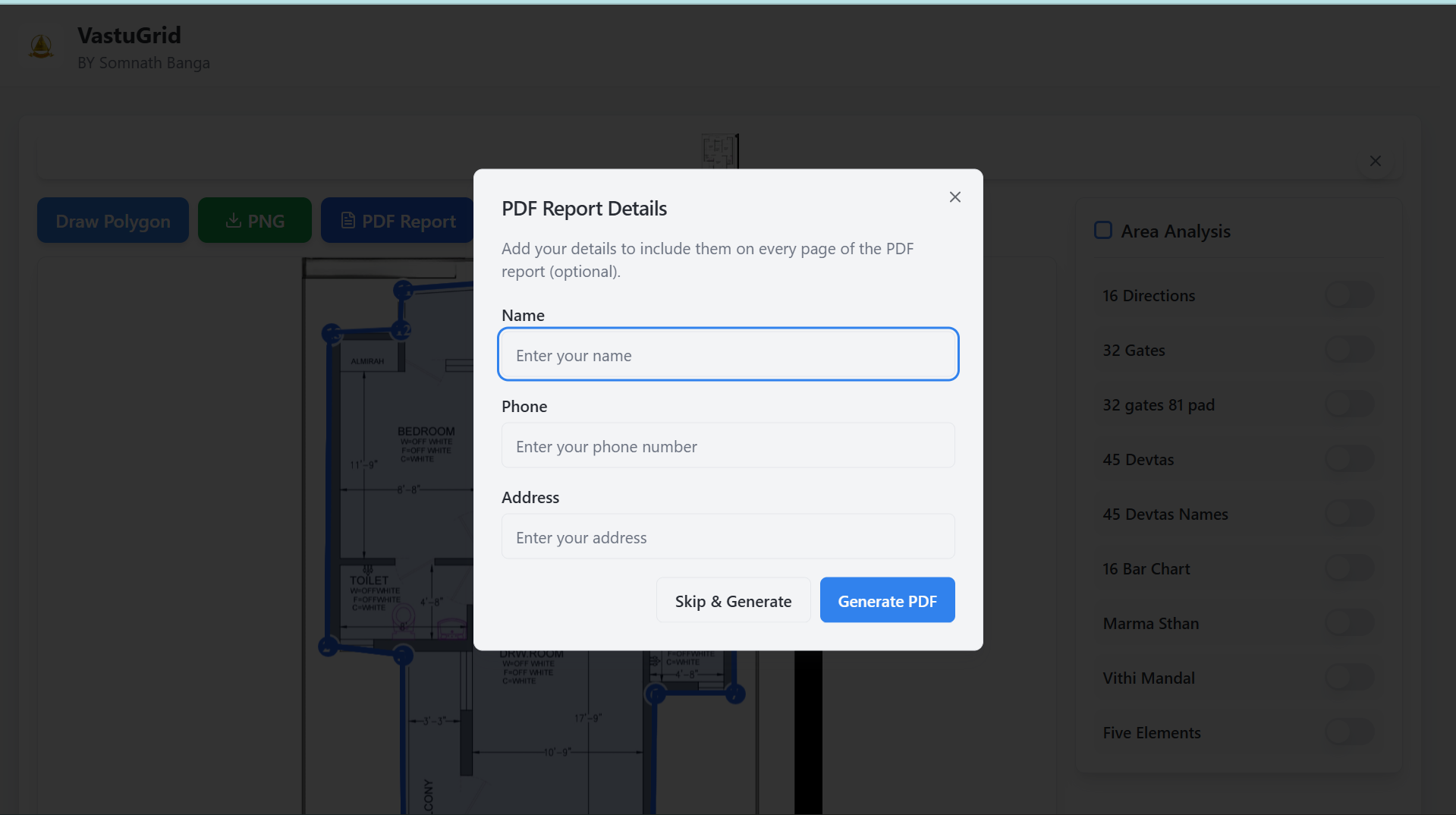
Generate a structured, professional PDF report containing the complete analysis output with one click — ready for client delivery.
Real properties are rarely perfect squares. In Indian urban centers, practitioners frequently encounter L-shaped flats, triangular corner plots, trapezoidal industrial parcels, and classical configurations like Sher-Mukhi (wider in front) and Gaumukhi (wider at the rear). VastuGrid's polygon boundary tool allows you to place arbitrary vertices, computing the center point and adjusting grid scaling and Brahmasthan positioning accurately — avoiding the common drafting errors that occur with manual methods on irregular sites.
An in-depth Vastu audit is only as valuable as the consultant's ability to communicate it clearly to the client. Preparing diagrams, zone tables, entrance charts, and Devta overlays manually in Word or PowerPoint takes hours of repetitive drafting per property.
VastuGrid simplifies this with automated reporting. With a single click, the platform compiles all analytical calculations into a structured, high-resolution PDF document that you can deliver directly to clients, architects, or project stakeholders.
VastuGrid is designed for practitioners who value speed, accuracy, and clear client presentation.
Production screenshots from the active VastuGrid workspace. Click any thumbnail to explore the interface.
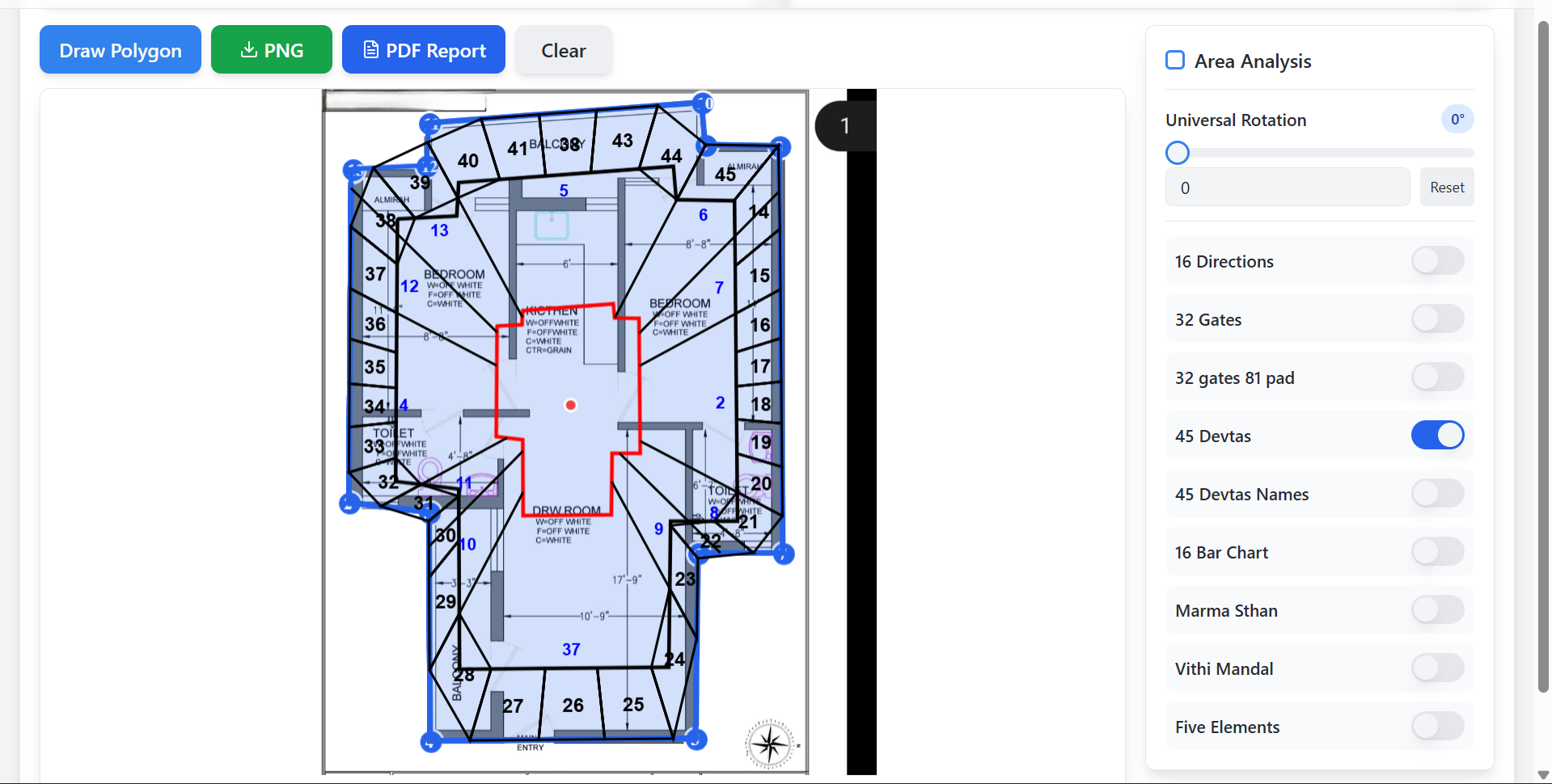
From tracing property boundaries to generating the client-ready PDF report.
VastuGrid does not replace a practitioner's advisory wisdom. It removes tedious, repetitive drafting work — so you focus entirely on spatial assessment and client guidance.
| Analytical Task | Manual Drafting Method | With VastuGrid Software |
|---|---|---|
| Drawing the 9×9 Vastu grid | Ruler, compass & tracing paper, or manual CAD overlay adjusted line by line | Automatically generated, scaled, and rotated to match boundary geometry in seconds |
| 45 Devta identification | Tedious manual lookup across reference charts for all 81 padas per property | All 45 Devtas positioned instantly with visual labels and boundary demarcations |
| 32 entrance pada evaluation | Manual compass angle calculation and fractional perimeter division | Calculated automatically from compass orientation in degrees with classical attributes |
| Irregular & L-shaped plots | Extremely difficult to grid accurately — high risk of centroid and pada misplacement | Arbitrary polygon tool calculates the center point and proportional pada grid |
| Brahmasthan calculation | Calculating center points on non-rectangular layouts is complex and error-prone | Computed automatically from perimeter geometry, demarcating the sacred 9-pada core |
| Client PDF report generation | Compiling charts and screenshots manually in Word or PowerPoint takes hours of repetitive work | One-click PDF generation producing structured, client-ready documentation |
| Mobility & field access | Tied to a specific office computer or printed paper drawings | Works directly in modern web browsers across desktop, tablet, and mobile smartphones |
VastuGrid is paid professional software. Two trial options let you test every feature on real client projects before committing to an annual license.
Built for professional Vastu analysis · Browser-based · Desktop · Tablet · Mobile · 9×9 Grid · 45 Devtas · PDF Reports

Scan with any UPI application. After completing the payment, send the transaction screenshot to WhatsApp: +91 73035 57911 — your software access will be activated promptly.
VastuGrid is paid professional software. Trial access allows you to test every feature on real property plans (up to 3 uses per tool on the 1-Day Trial, up to 5 uses on the 3-Day Trial) before committing to an annual plan. There are no recurring auto-debits or hidden fees.
VastuGrid is a professional Vastu software platform designed for consultants, architects, and astrologers. It provides an automated 9×9 Vastu Purusha Mandala engine, maps all 45 Devtas across 81 padas, identifies 16 directional zones, calculates 32 perimeter entrance padas, handles irregular plot shapes with polygon drafting, and exports professional PDF reports directly in modern web browsers.
VastuGrid is professional online Vastu software designed for property analysis. It allows practitioners to upload or draw floor plans, set compass orientation in degrees, generate classical 9×9 grids, and conduct comprehensive assessments including 45 Devtas, 16 directional zones, 32 entrance padas, Brahmasthan, and 5 Elements. It runs entirely in your web browser without local software installation.
Unlike traditional desktop Vastu software that requires dedicated computer installations, VastuGrid operates directly in modern web browsers across desktop, tablet, and mobile. Furthermore, VastuGrid supports arbitrary polygon boundary drafting for irregular and L-shaped plots, computes the center point and boundary proportions accurately, and generates client-ready PDF documentation with one click.
Yes. VastuGrid is fully responsive and touch-optimized. You can use VastuGrid from your mobile browser on Android smartphones and iPhones, as well as on tablets (iPad, Galaxy Tab). This allows consultants to carry out on-site audits, verify entrance padas at the front gate, and check room orientations directly in the field.
Yes. VastuGrid works through modern mobile web browsers such as Google Chrome on Android and Apple Safari on iPhone. You do not need to install an APK or native app; you simply sign in to your VastuGrid account from your smartphone browser and access all features.
VastuGrid is engineered as a web application that runs directly in your browser. It is not currently distributed as a downloadable native app on Google Play or the Apple App Store. This eliminates the need for manual app updates, permissions, or device storage, while giving you the complete power of professional software on any phone, tablet, or computer.
Yes. You can upload an architectural floor plan image (in JPG or PNG format) into VastuGrid, set the property's compass orientation in degrees, trace the property boundary over the drawing, and apply the 9×9 Vastu grid, 16 zones, and 45 Devtas directly on top of the actual layout.
The 9×9 Vastu grid represents the classical Vastu Purusha Mandala, dividing a property into 81 padas (sub-squares). Each pada corresponds to specific cosmic and elemental forces governed by 45 Devtas. In VastuGrid, this grid is computed, scaled, and aligned to the property's compass orientation in degrees automatically.
VastuGrid automatically maps all 45 Devtas across the 81 padas, with visible labels and energy-field boundaries directly on the property plan.
VastuGrid divides the perimeter into 32 entrance padas (8 along each cardinal face: North N1–N8, East E1–E8, South S1–S8, West W1–W8) based on calibrated compass degrees. You identify the location of the main gate or front door, and the software immediately displays its classical attributes and classification according to classical Vastu texts.
Yes. The built-in polygon drawing tool allows you to trace L-shaped apartments, triangular corner plots, trapezoidal sites, cut-corner buildings, and classical Sher-Mukhi or Gaumukhi properties. VastuGrid calculates the center point and adjusts the 9×9 grid and Brahmasthan proportionally.
The Brahmasthan is the sacred energetic core of a property, occupying the central 9 padas of the Vastu Purusha Mandala. It should remain open, light, and free of heavy structural loads, toilets, or pillars. VastuGrid calculates the Brahmasthan boundary coordinates automatically from the drawn boundary polygon.
In addition to the 9×9 grid, 45 Devtas, 16 zones, and 32 entrances, VastuGrid includes Marmasthan analysis (sensitive energy lines), Panch Tatva (5 Elements distribution), a Land Energy Checker for raw plots, Numerovastu for name and house number resonance, and Shakti Chakra with planetary lordship overlays.
Yes. VastuGrid features one-click PDF report export. The resulting document includes the high-resolution floor plan overlay, 9×9 grid, 45 Devta positions, 16-zone directional energy graph, 32 entrance pada table, and elemental distribution — formatted and ready for client delivery.
VastuGrid is built for professional Vastu consultants, architects, interior designers, astrologers, AstroVastu practitioners, builders, and real estate developers. Serious homeowners and property buyers can also use it to evaluate prospective homes before purchasing or renovating.
VastuGrid is paid professional software and does not offer free lifetime accounts. To allow practitioners to test every feature on real projects before making an annual commitment, a 1-day trial is available for ₹501 and a 3-day trial for ₹1,100. When you upgrade from the 3-day trial to the Yearly Plan, ₹1,100 is deducted from the annual price.
Pricing is transparent: ₹501 for a 1-Day Trial, ₹1,100 for a 3-Day Trial, and ₹5,500/year for the Yearly Plan with unlimited usage. You can purchase instantly via Razorpay or scan the UPI QR code and message your payment screenshot to WhatsApp at +91 73035 57911 for prompt access activation.
Analyse properties, create 9×9 Vastu grids, map 45 Devtas and generate professional reports from desktop, tablet or mobile.
Questions? Chat directly with us on WhatsApp: +91 73035 57911Comprehensive reference guides and analytical frameworks for professional practitioners.